Plat
Use this class to plat land within a single Twp/Rge.
The three methods for adding lands to the Plat are:
.add_description(), for adding the full text of a land description.
.add_tract(), for adding apytrs.Tract(already parsed).
.add_tracts(), for adding multiplepytrs.Tractobjects (already parsed), such aspytrs.PLSSDescorpytrs.TractListobjects, which contain tracts.
See
LotDefiner
for how to work with the .lot_definer attribute.
See
Settings
for how to work with the .settings attribute.
See this discussion on working with multiple layers for using multiple colors for different tracts.
Note
A Plat accepts only one Twp/Rge, and if different Twp/Rges are
encountered, it will raise a ValueError. If you can’t be sure
that your description(s) will contain only a single Twp/Rge, you
should consider using a PlatGroup or MegaPlat, which allow
multiple Twp/Rges.
Example Image
(Resized from original output. Click to see full size.)
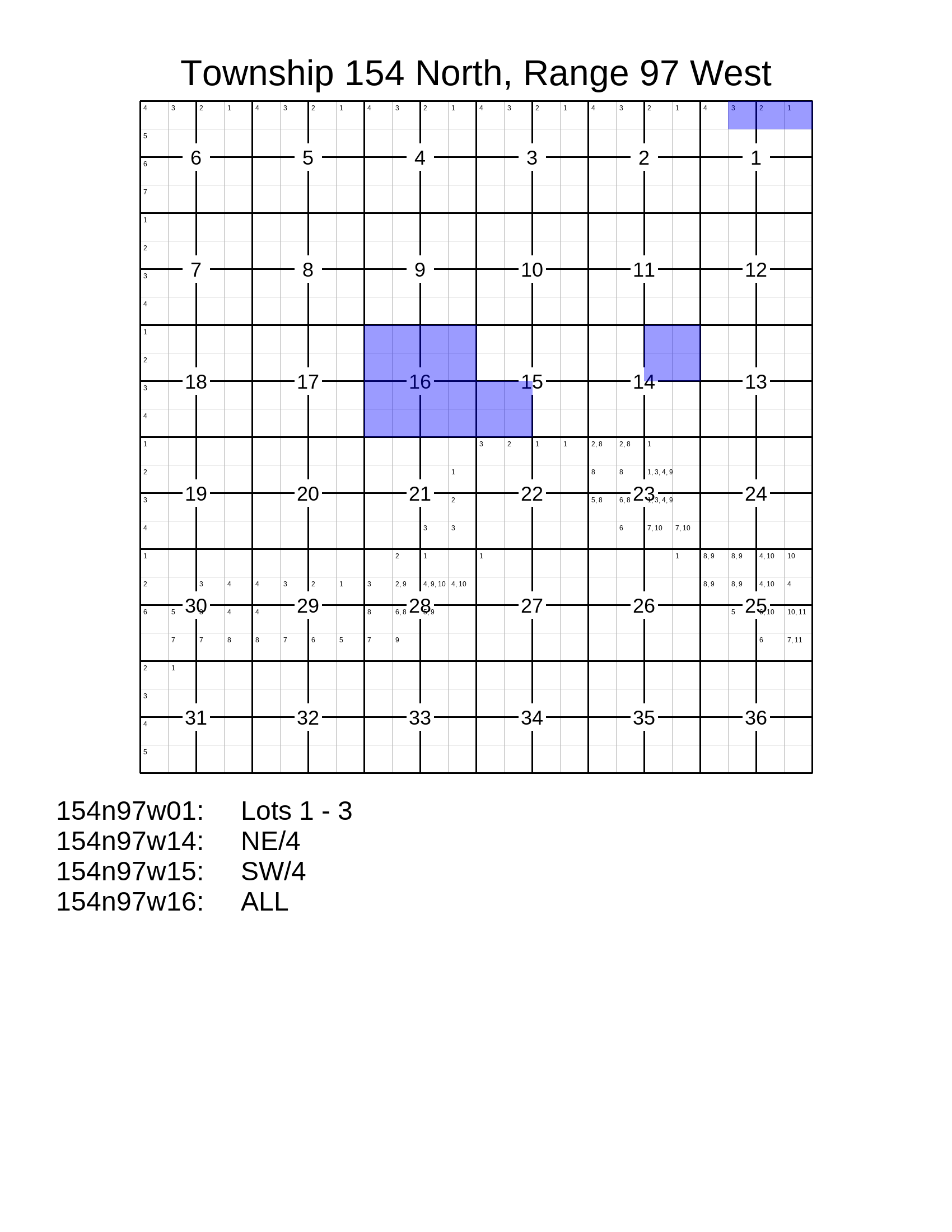
Example Code
This results in the image above.
import pytrs
import pytrsplat

# Choose a settings preset.
letter_preset = pytrsplat.Settings.preset('letter')
# Adjust settings as desired.
letter_preset.set_font('footer', typeface='Sans-Serif', size=48)
letter_preset.write_lot_numbers = True

# If we don't set Twp/Rge here, it will be set when adding a tract.
plat = pytrsplat.Plat(twp='154n', rge='97w', settings=letter_preset)
# If we've written lot definitions to .csv, we load them here.
plat.lot_definer.read_csv('some_lot_definitions.csv')
# Otherwise / additionally, we can assume 'default' lots.
plat.lot_definer.allow_defaults = True
plat.lot_definer.standard_lot_size = 40

# Add lands with `.add_description(), `.add_tract()`, or `.add_tracts()`.

# `config` gets passed to pytrs for parsing.
plat.add_description(
    "T154N-R97W Sec 1: Lots 1 - 3, Sec 14: NE/4",
    config='n,w'    # Optional, control parsing of description.
)

tract = pytrs.Tract(
    desc='SW/4',
    trs='154n97w15',
    parse_qq=True,  # parse_qq=True is REQUIRED
    config='n,w'    # Optional, control parsing of description.
)
plat.add_tract(tract)

plss_desc = pytrs.PLSSDesc(
    'T154N-R97W Sec 16: ALL',
    parse_qq=True,  # parse_qq=True is REQUIRED
    config='n,w'    # Optional, control parsing of description.
)
plat.add_tracts(plss_desc)

# Executing the queue will fill in the plat.
plat.execute_queue()

# Save to PNG.
plat.output(fp=r'some\path\plat_154n97w.png')
# or to PDF (or nearly any other image format).
plat.output(fp=r'some\path\plat_154n97w.pdf')
# or as a PNG inside a zip file.
plat.output(fp=r'some\path\plat_154n97w.zip', image_format='png')
Methods and Attributes
- class pytrsplat.Plat(twp: str = None, rge: str = None, settings: Settings = None, lot_definer: LotDefiner = None)
A plat of a single Twp/Rge.
- __init__(twp: str = None, rge: str = None, settings: Settings = None, lot_definer: LotDefiner = None)
- Parameters:
twp – The Twp of the Twp/Rge represented by this Plat.
rge – The Rge of the Twp/Rge represented by this Plat.
settings – The
Settingsobject to control the behavior and appearance of this plat. (Will be overridden by the settings inowner, if that is passed.)
- add_description(txt: str, config: str = None, layer: str = None) TractList
Parse the land description and add the resulting tracts to the queue.
Note
All tracts in the queue must share the same Twp/Rge, or a
ValueErrorwill be raised. If there is any doubt about whether the land description being added includes other Twp/Rges, consider using a platting object (e.g.,PlatGrouporMegaPlat) that can process multiple Twp/Rges.- Parameters:
txt – The land description.
config – The config parameters for parsing, to be passed through to the
pytrslibrary. (See pyTRS documentation for details.)layer – Name of the layer to add this description to.
- Returns:
A
pytrs.TractListcontaining the tracts in which the parser could NOT identify any lots or aliquots.- Raises:
ValueError – If a Twp/Rge is added that does not share the same Twp/Rge of every other tract in the queue.
- add_tract(tract: Tract, layer: str = None) None
Add a tract to the queue. If there are already tracts in the queue, this tract must match the existing Twp/Rge, or it will raise a
ValueError.Note
The tract must already be parsed for lots/QQs. (See
pyTRSdocumentation for details.)- Parameters:
tract – A
pytrs.Tractthat has been parsed into Lots and QQ’s. (Its Twp/Rge must match what is already in the queue.)layer – Name of the layer to add this tract to.
- Raises:
ValueError – If a Twp/Rge is added that does not share the same Twp/Rge of every other tract in the queue.
- add_tracts(tracts: list[Tract] | TractList | PLSSDesc, layer: str = None) None
Add multiple tracts to the queue. All tracts must share the same Twp/Rge as any tracts already existing in the queue.
Note
The tracts must already be parsed for lots/QQs. (See
pyTRSdocumentation for details.)Note
All tracts in the queue must share the same Twp/Rge, or a
ValueErrorwill be raised. If there is any doubt about whether the tracts being added include other Twp/Rges, consider using a platting object (e.g.,PlatGrouporMegaPlat) that can process multiple Twp/Rges.- Parameters:
tracts – A collection of
pytrs.Tractobjects, such as apytrs.PLSSDesc,pytrs.TractList, or any other iterable object that contains exclusivelypytrs.Tract.layer – Name of the layer to add these tracts to.
- Raises:
ValueError – If a Twp/Rge is added that does not share the same Twp/Rge of every other tract in the queue.
- carve_description(txt: str, config: str = None, layer: str = None) TractList
Parse the land description and carve out the resulting tracts from the queue, so that they do not appear on the resulting plat.
(Affects only which lands get filled in on the plat. This carve-out will NOT prevent tracts from being written to the footer, if so configured.)
Note
All carve-outs override the queue for a given layer. In other words, when the queue is executed, all added lands will be platted for that layer, then all carved-out lands will be removed from that layer. This means that carved-out lands cannot be re-added to the queue for that same layer. They can be added to the queue for a different layer.
Carve-outs for any given layer can be cleared with
.clear_layer_carveouts(layer=<name>).Warning
Any lots or aliquots identified in this description will be removed from the layer. Be careful to use a ‘clean’ description that will not remove lands that should be kept.
- Parameters:
txt – The land description.
config – The config parameters for parsing, to be passed through to the
pytrslibrary. (See pyTRS documentation for details.)layer – Name of the layer to carve this description from.
- Returns:
A
pytrs.TractListcontaining the tracts in which the parser could NOT identify any lots or aliquots.
- carve_tract(tract: Tract, layer: str = None) None
Carve out lands (single tract) from the queue, so that they do not appear on the resulting plat.
(Affects only which lands get filled in on the plat. This carve-out will NOT prevent tracts from being written to the footer, if so configured.)
Note
The tract must already be parsed for lots/QQs. (See
pyTRSdocumentation for details.)Note
All carve-outs override the queue for a given layer. In other words, when the queue is executed, all added lands will be platted for that layer, then all carved-out lands will be removed from that layer. This means that carved-out lands cannot be re-added to the queue for that same layer. They can be added to the queue for a different layer.
Carve-outs for any given layer can be cleared with
.clear_layer_carveouts(layer=<name>).Warning
Any lots or aliquots identified in this tract will be removed from the layer. Be careful to use a ‘clean’ description that will not remove lands that should be kept.
- Parameters:
tract – A
pytrs.Tractthat has been parsed into Lots and QQ’s. (Its Twp/Rge must match what is already in the queue.)layer – Name of the layer to carve this tract from.
- carve_tracts(tracts: list[Tract] | TractList | PLSSDesc, layer: str = None) None
Carve out lands (multiple tracts) from the plat, so that they do not appear on the resulting plat.
(Affects only which lands get filled in on the plat. This carve-out will NOT prevent tracts from being written to the footer, if so configured.)
Note
The tracts must already be parsed for lots/QQs. (See
pyTRSdocumentation for details.)Note
All carve-outs override the queue for a given layer. In other words, when the queue is executed, all added lands will be platted for that layer, then all carved-out lands will be removed from that layer. This means that carved-out lands cannot be re-added to the queue for that same layer. They can be added to the queue for a different layer.
Carve-outs for any given layer can be cleared with
.clear_layer_carveouts(layer=<name>).Warning
Any lots or aliquots identified in these tracts will be removed from the layer. Be careful to use ‘clean’ descriptions that will not remove lands that should be kept.
- Parameters:
tracts – A collection of
pytrs.Tractobjects, such as apytrs.PLSSDesc,pytrs.TractList, or any other iterable object that contains exclusivelypytrs.Tract.layer – Name of the layer to carve these tracts from.
- clear_layer_carveouts(layer: str = None)
Clear the carve-outs for the specified
'layer'.- Parameters:
layer – Name of the layer to clear the carve-outs for.
- clear_layer_queue(layer: str = None, include_carveouts=False)
Clear the contents of the queue for the specified
'layer'.- Parameters:
layer – Name of the layer to clear the queue for.
include_carveouts – (Optional) Also clear any carve-outs for this layer.
- execute_queue(prompt_define=False) TractList
Execute the queue of tracts to fill in the plat.
- Parameters:
prompt_define – (Optional) If
True, first check for undefined lots, and prompt the user in console to define them.- Returns:
A
pytrs.TractListcontaining all tracts that could not be platted (no lots or aliquots identified).
- find_undefined_lots(allow_defaults: bool = None, fp: str | Path = None, **headers) dict[str, list[str]]
Find all tracts in the queue that have one or more lots that have not been defined. Optionally write them to a .csv file at path
fp, to facilitate defining them externally.Warning
If passing
fp, any file at that path will be overwritten without warning.- Parameters:
allow_defaults – Whether to assume that all sections are ‘standard’, with typical lots (if any) in sections along the north and west township boundaries. If not specified here, will use whatever is configured in the
lot_definer.allow_defaultsattribute.fp – (Optional) A filepath at which to create a .csv file containing the undefined lots.
headers – (Optional) If saving the undefined lots to a .csv file, pass keyword arguments to specify the desired headers. (Reference the docs for
LotDefiner.save_to_csv()for the appropriate parameters.)
- Returns:
A dict, keyed by Twp/Rge/Sec (
'154n97w01'), whose values are a sorted list of lots for that Twp/Rge/Sec.
- find_unplattable_tracts(allow_defaults: bool = None) TractList
Get a
pytrs.TractListcontaining all tracts that cannot be platted with the currently provided lot definitions (optionally accounting for default lots, if so configured).Note
If a tract has any aliquots and/or any lots that have been defined, it will be considered plattable, even if some of its lots have NOT been defined. To check for undefined lots, use the
.find_undefined_lots()method.- Parameters:
allow_defaults – Whether to assume that all sections are ‘standard’, with typical lots (if any) in sections along the north and west township boundaries. If not specified here, will use whatever is configured in the
lot_definer.allow_defaultsattribute.
- output(fp: str | Path = None, image_format: str = None, layers: list[str] = None, image_mode: str = 'RGB', **_kw) Image | None
Compile and return the merged image of the plat. Optionally save the results to disk, either as an image or as a .zip file containing the image.
- Parameters:
fp – (Optional) If provided, save the output to the specified filepath.
image_format – (Optional) Override the image format of the file specified in
fp. If not provided, will defer to the file extension infp. (Only relevant if saving to file.)layers – (Optional) Choose which image layers (in bottom-up order) to include in the output. (See
Plat.DEFAULT_LAYER_NAMESfor the standard layer names.) Nonexistent or empty layers will be ignored. Any custom layers created by.add_description(..., layer=<name>)(and similar methods) will be included by default, unless thelayers=parameter is used here.image_mode – Specify which image mode to convert the merged output to. Defaults to
'RGB'. (ReferencePIL.Image.Image.convert()for further details.)_kw – No effect. (Included to mirror
.output()of other classes.)
- Returns:
The generated image. If no layers have been configured and/or
layerscontains only layers that are nonexistent or empty, will returnNoneinstead.
- prompt_define(allow_defaults: bool = None)
Prompt the user in console to define all lots that have not yet been defined for tracts in the queue. Any new lot definitions will be added to the
.lot_definer.(You may wish to save the results with
.lot_definer.save_to_csv()so that they can be loaded and reused later.)- Parameters:
allow_defaults – Whether to assume that this section is ‘standard’, with typical lots (if any) in sections along the north and west township boundaries. If not specified here, will use whatever is configured in the
.lot_definer.allow_defaultsattribute.
Write a block of text in the footer.
- Parameters:
txt – The block of text to write.
write_partial – (Optional, off by default) If there is not space to write the entire block of text, write whatever will fit.
- write_header(custom_header: str = None, **kw) None
Write the header to the top of the plat.
Note
The default header is the Twp/Rge, styled as follows
Township 154 North, Range 97 West. ifshort_header=Truein the settings, the resulting header will be styled asT154N-R97W. The header can be styled differently if appropriate keyword arguments are passed askw. Further, the exact header text can be passed ascustom_header, which will override everything else.- Parameters:
custom_header – (Optional) Override the default header and use this text instead. If used, any other keyword arguments will be ignored.
kw – (Optional) keyword arguments to pass to
pytrs.TRS.pretty_twprge()to control how the Twp/Rge header should be spelled out.
- write_lot_numbers(at_depth=2, only_for_queue: bool = None)
Write the lot numbers to the plat.
- Parameters:
at_depth – Depth at which to write the lots. Default is 2 (i.e., quarter-quarters).
only_for_queue – (Optional) If
True, only write section numbers for those sections that appear in the queue.
- write_tracts(tracts: list[Tract] | TractList | PLSSDesc = None)
Write all the tract descriptions in the footer.