LotDefiner
A LotDefiner is used to convert lots into aliquots.
A Plat, PlatGroup, and MegaPlat will have a LotDefiner
in its .lot_definer attribute, which can be specified at init
(lot_definer=<some LotDefiner object>) and/or modified later.
import pytrsplat

# Exclusively use defaults.
default_lot_definer = pytrsplat.LotDefiner(
    allow_defaults=True,
    standard_lot_size=40
)
plat = pytrsplat.Plat(lot_definer=default_lot_definer)

# Again use defaults.
megaplat = pytrs.MegaPlat()
megaplat.lot_definer.allow_defaults = True
megaplat.lot_definer.standard_lot_size = 80

# Use definitions that have been entered into a .csv file somewhere.
better_lot_definer = pytrsplat.LotDefiner.from_csv(r'some/path/lotdef.csv')
multipage_plat = pytrsplat.PlatGroup(lot_definer=better_lot_definer)
# Can still allow defaults for sections that don't have definitions.
multipage_plat.lot_definer.allow_defaults = True
multipage_plat.lot_definer.standard_lot_size = 40
Default lots
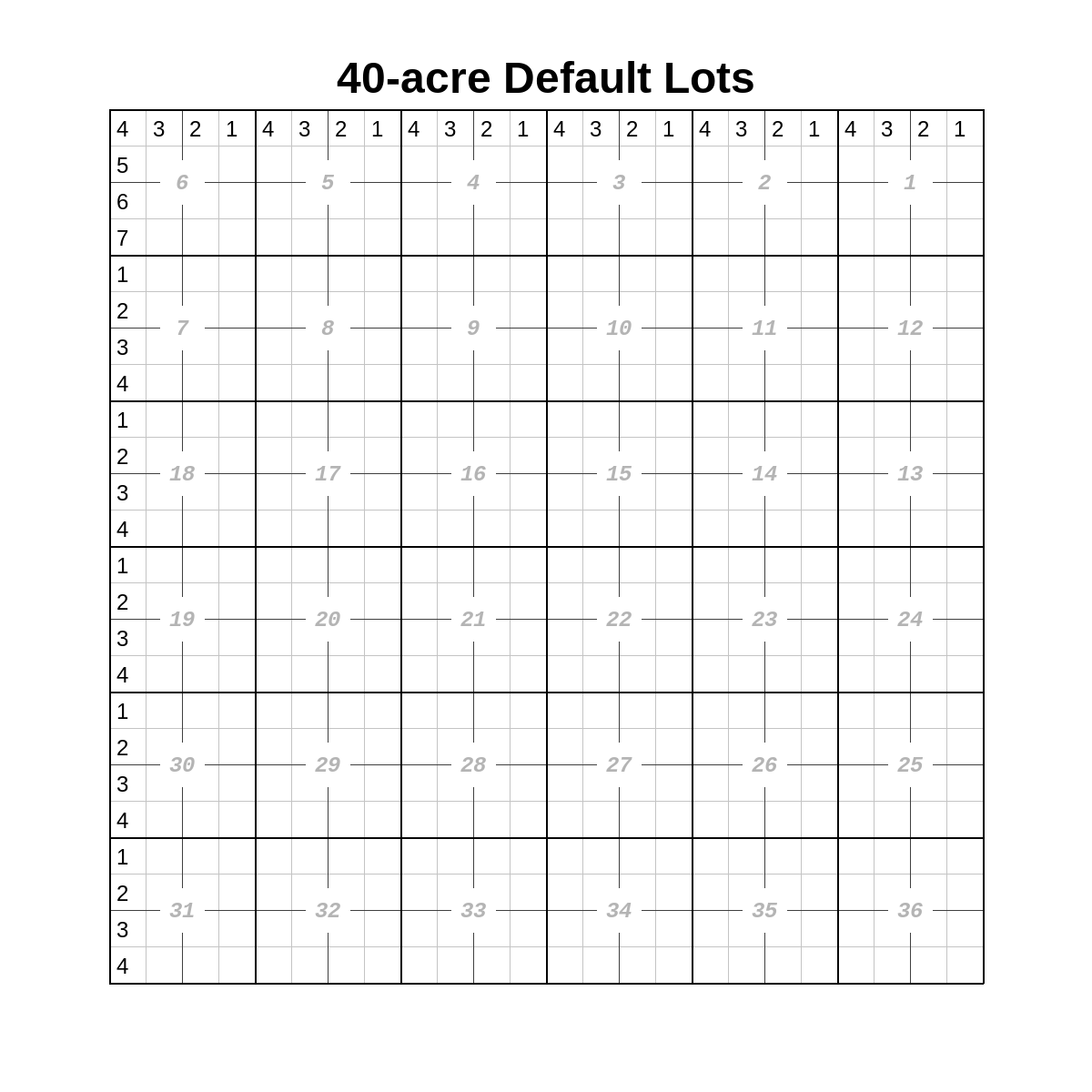
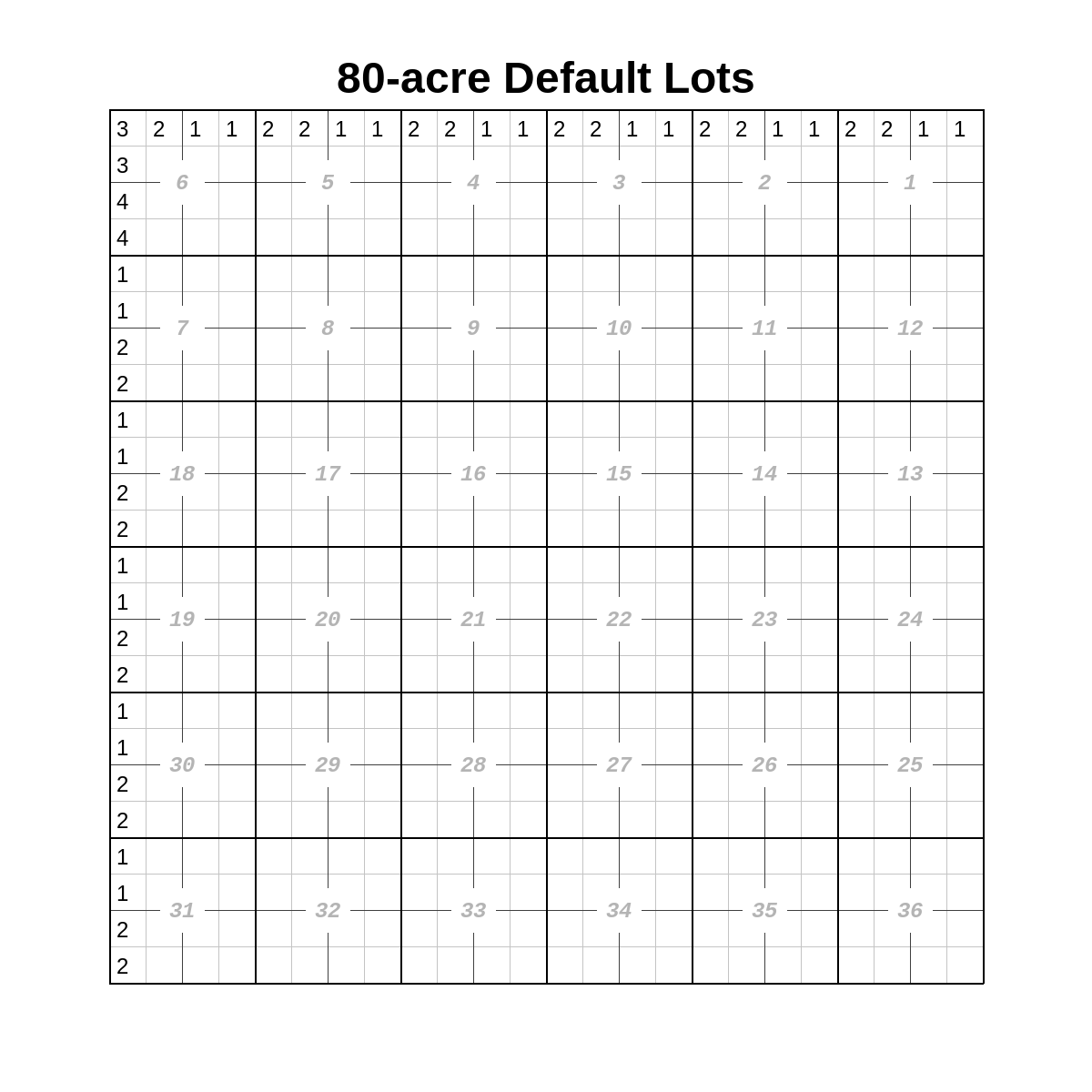
In a ‘typical’ township, lots exist in the sections along the north and west boundaries of the township – i.e., Sections 1 - 7, 18, 19, 30, and 31.
Usually, these are roughly 40-acre lots (.standard_lot_size = 40),
but in some parts of the United States, they are approximately 80 acres
(.standard_lot_size = 80). Other layouts probably exist but are not
implemented in this library.
We can use allow_defaults = True to assume that the sections in the
queue are ‘typical’.
Default lots, where .standard_lot_size = 40:
Default lots, where .standard_lot_size = 80:
Defining lots in .csv
The most efficient way to define lots is to add them to a .csv file and
load them into a LotDefiner with LotDefiner.from_csv() or later
with .read_csv().
import pytrsplat

lot_definer = pytrsplat.LotDefiner.from_csv(r'some/path/lot_definitions.csv')
# Keep the original definitions and add more of them from elsewhere.
lot_definer.read_csv(r'other/path/more_definitions.csv')
Below is an example of appropriate .csv formatting:
twp |
rge |
sec |
lot |
|
|---|---|---|---|---|
154n |
97w |
1 |
L1 |
NENE |
12s |
58e |
04 |
1 |
N2NE,SENE |
Note
sec may optionally have a leading 0 (e.g., 4 or '04').
lot may optionally have a leading L (e.g., 1 or
'L1').
qq can be one or more aliquots, separate by comma as needed.
Be sure to use ‘clean’ QQ definitions, such as the above.
Defining lots in code
import pytrsplat

lot_definer = pytrsplat.LotDefiner()
lot_definer.define_lot(
    trs='154n97w23',
    lot=1,
    definition='W2NE,NWSE'
)
trs must be in the standard pyTRS format, such as '154n97w01' or
'2s58e24'.
Defining lots manually in console
When calling .execute_queue() on any plat-generating class, use parameter
prompt_define=True to first check for undefined lots, and then prompt the
user in the console to define them individually.
import pytrsplat

plat = pytrs.Plat(twp='154n', rge='97w')
plat.add_description('T154N-R97W Sec 1: Lots 1 and 2')
plat.execute_queue(prompt_define=True)  # Also works with `PlatGroup` and `MegaPlat`
Alternatively, if we want to prompt the user to define lots separately
from executing the queue, by calling .prompt_define() on a LotDefiner
object, and passing to it the list of pytrs.Tract objects.
import pytrsplat

some_list_of_tracts = pytrs.TractList()
# <fill some_list_of_tracts with pytrs.Tract objects>
# ...

some_lot_definer = pytrsplat.LotDefiner()
some_lot_definer.prompt_define(some_list_of_tracts)
# <Do whatever we want with the lot definitions.>
some_lot_definer.save_to_csv(r'some/path/manually_defined_lots.csv')

# ...
# And eventually, generate the plat.
plat = pytrs.Plat(twp='154n', rge='97w', lot_definer=some_lot_definer)
plat.add_tracts(some_list_of_tracts)
plat.execute_queue()
plat.output(fp=r"some/path/image.png")
Undefined Lots
When executing the queue in a Plat or other object, if a tract with
an undefined lot is encountered, a custom
pytrsplat.UndefinedLotWarning
will be displayed, but no error will be raised.
To check the queue for undefined lots prior to executing the queue, call
.find_undefined_lots().
import pytrsplat
plat = pytrsplat.Plat()
plat.add_description('T154N-R97W, Sec 9: Lot 1')

# plat.execute_queue()  # Would show a warning of undefined lots: <154n97w09: L1>
undefined_lots = plat.find_undefined_lots()
print(undefined_lots)   # {'154n97w09': ['L1']}
Or simply use .execute_queue(prompt_define=True)
as mentioned above.
Methods and Attributes
- class pytrsplat.LotDefiner(allow_defaults=False, standard_lot_size: int = 40)
A class for specifying which lots correspond to which aliquots, and for converting those lots into aliquots.
Can be passed as
lot_definer=when initializing one of the various plat types, or accessed / modified in its.lot_definerattribute later.Important attributes:
.allow_defaults- Whether to assume that all sections are ‘standard’, with typical lots (if any) in sections along the north and west township boundaries. Can be set at init withallow_defaults=<bool>(off by default)..standard_lot_size- How big we assume a ‘standard’ lot is in the township(s) being considered. Must be either40or80. (This determines the default lot definitions.) Can be set at init withstandard_lot_size=<40 or 80>. (40by default.)
- __init__(allow_defaults=False, standard_lot_size: int = 40)
- Parameters:
allow_defaults – Whether to assume that all sections are ‘standard’, with typical lots (if any) in sections along the north and west township boundaries. Can be changed later in the
.allow_defaultsattribute.standard_lot_size – How big we assume a ‘standard’ lot is in the township(s) being considered. Must be either
40or80. (This determines the default lot definitions.) Can be changed later in the.standard_lot_sizeproperty.
- convert_lots(lots: list[str], trs: str, allow_defaults: bool = None)
Convert a list of lots (from the
.lotsof apytrs.Tractobject) into corresponding aliquots.- Parameters:
lots – The list of lots to convert.
trs – The Twp/Rge/Sec (in the pyTRS format,
'154n97w01') of the section that the lots belong to.allow_defaults – Whether to assume that this section is ‘standard’, with typical lots (if any) in sections along the north and west township boundaries. If not specified here, will use whatever is configured in the
.allow_defaultsattribute.
- Returns:
List of converted lots (as aliquots); and a list of lots that could not be converted.
- defaults(twp, rge)
Get default lot definitions for this Twp/Rge.
- define_lot(trs: str | TRS, lot: int | str, definition: str)
- Parameters:
trs – The Twp/Rge/Sec in the pyTRS format (e.g.,
'154n97w01').lot – The lot number, either as
'L1'or as int.definition – The aliquots that make up this lot, separated by comma if necessary. (Be sure to use
'clean_qq'compatible definitions, such as'NENE'or'N2NW,SENW'. (Reference the pyTRS documentation for more info.)
- find_undefined_lots(tracts: list[Tract] | TractList | PLSSDesc, allow_defaults: bool = None, fp: str | Path = None, **headers) dict[str, list[str]]
Find all tracts that have one or more lots that have not been defined. Optionally write them to a .csv file at path
fp, to facilitate defining them externally.Warning
If passing
fp, any file at that path will be overwritten without warning.- Parameters:
tracts – A collection of
pytrs.Tractobjects that have been parsed to lots and QQs.allow_defaults – Whether to assume that all sections are ‘standard’, with typical lots (if any) in sections along the north and west township boundaries. If not specified here, will use whatever is configured in the
.allow_defaultsattribute.fp – (Optional) A filepath at which to create a .csv file containing the undefined lots.
headers – (Optional) If saving the undefined lots to a .csv file, pass keyword arguments to specify the desired headers. (Reference the docs for
LotDefiner.save_to_csv()for the appropriate parameters.)
- Returns:
A dict, keyed by Twp/Rge/Sec (
'154n97w01'), whose values are a sorted list of lots for that Twp/Rge/Sec.
- classmethod from_csv(fp: str | Path, twp='twp', rge='rge', sec='sec', lot='lot', qq='qq', allow_defaults=False, standard_lot_size: int = 40) LotDefiner
Create a
LotDefinerfrom csv file. The data should be compatible withpyTRSformatting.Example .csv formatting:
twp
rge
sec
lot
qq
154n
97w
1
L1
NENE
12s
58e
04
1
N2NE,SENE
secmay optionally have a leading0(e.g.,4or'04').lotmay optionally have a leadingL(e.g.,1or'L1').qqcan be one or more aliquots. Be sure to use ‘clean’ QQ definitions, such as the above.- Parameters:
fp – Path to the .csv file to load.
twp – Header for the Twp column.
rge – Header for the Rge column.
sec – Header for the Sec column.
lot – Header for the Lot column.
qq – Header for the lot definition (aliquots) column.
allow_defaults – Whether to assume that all sections are ‘standard’, with typical lots (if any) in sections along the north and west township boundaries. Can be changed later in the
.allow_defaultsattribute.standard_lot_size – How big we assume a ‘standard’ lot is in the township(s) being considered. Must be either
40or80. (This determines the default lot definitions.) Can be changed later in the.standard_lot_sizeproperty.
- get_all_definitions(include_defaults: bool = None, mandatory_twprges: list[str] = None) dict[str, dict[str, str]]
Get all definitions, including any defaults (if so configured or requested).
- Parameters:
include_defaults – Whether to include defaults in the returned definitions. If not specified here, will use whatever has been configured in
.allow_defaults.mandatory_twprges – (Optional) A list of Twp/Rge’s (in the
pyTRSformat,'154n97w') that must be included in the return definitions. Will add any such Twp/Rge that is not already found in thisLotDefiner.
- Returns:
A dict of definitions that looks like this:
{'154n97w01': {'L1': 'NENE', 'L2', 'NWNE'} }
- process_tract(tract: pytrs.Tract, allow_defaults: bool = None, commit=True)
Convert
.lotsin thetractinto QQs, identify any undefined lots. Ifcommit=True, set them to ad-hoc attributes.lots_as_qqsandundefined_lots, respectively.- Parameters:
tract – A
pytrs.Tractobject that has already been parsed into lots and QQs.allow_defaults – Whether to assume that this section is ‘standard’, with typical lots (if any) in sections along the north and west township boundaries. If not specified here, will use whatever is configured in the
.allow_defaultsattribute.commit – (Optional, on by default). Whether to store the results to
.lots_as_qqsandundefined_lots.
- Returns:
Two lists: The first being the converted aliquots, and the second being a list of lots that have not been defined.
- process_tracts(tracts: list[Tract] | TractList | PLSSDesc) None
Convert
.lotsin thetractsinto QQs, and add them to ad-hoc attribute.lots_as_qqsfor each tract. Also add an ad-hoc.undefined_lotsattribute to each tract for any lots that have not been defined.- Parameters:
tracts – A container of
pytrs.Tractobjects that have already been parsed into lots and QQs.
- prompt_define(tracts: TractList, allow_defaults: bool = None)
Prompt the user in console to define all lots that have not yet been defined. Any new lot definitions will be added to the
LotDefiner.(You may wish to save the results with
.save_to_csv()so that they can be loaded and reused later.)- Parameters:
tracts – The tracts to check for undefined lots.
allow_defaults – Whether to assume that this section is ‘standard’, with typical lots (if any) in sections along the north and west township boundaries. If not specified here, will use whatever is configured in the
.allow_defaultsattribute.
- read_csv(fp: str | Path, twp='twp', rge='rge', sec='sec', lot='lot', qq='qq')
Load lot definitions from csv file into this existing
LotDefiner. The data should be compatible withpyTRSformatting.Example .csv formatting:
twp
rge
sec
lot
qq
154n
97w
1
L1
NENE
12s
58e
04
1
N2NE,SENE
secmay optionally have a leading0(e.g.,4or'04').lotmay optionally have a leadingL(e.g.,1or'L1').qqcan be one or more aliquots. Be sure to use ‘clean’ QQ definitions, such as the above.- Parameters:
fp – Path to the .csv file to load.
twp – Header for the Twp column.
rge – Header for the Rge column.
sec – Header for the Sec column.
lot – Header for the Lot column.
qq – Header for the lot definition (aliquots) column.
- save_to_csv(fp: str | Path, twp='twp', rge='rge', sec='sec', lot='lot', qq='qq')
Save the definitions (excluding defaults) to a .csv file that can be reloaded later with
.from_csv()or.read_csv().Warning
Will overwrite any file that exists as
fpwithout warning.- Parameters:
fp – Path to the .csv file to save to.
twp – Header for the Twp column.
rge – Header for the Rge column.
sec – Header for the Sec column.
lot – Header for the Lot column.
qq – Header for the lot definition (aliquots) column.