Using Multiple Layers
It is possible to write tracts to any platting class on different layers, optionally using a separate color for each.
Use the layer='some_layer' parameter when adding lands to a Plat, PlatGroup, or MegaPlat, to specify which layer those lands belong to. This parameter exists in all methods for adding lands – .add_description(), .add_tracts(), and .add_tract().
plat = pytrsplat.Plat()
plat.add_description('T154N-R97W Sec 14: NE/4', layer='some_layer')
plat.add_tracts(any_tractlist, layer='some_other_layer')
plat.add_tract(any_tract, layer='some_third_layer')
And set the fill color for a given layer, with the .settings.set_layer_fill() method:
# ... Continuing the above block of code.

plat.settings.set_layer_fill('some_layer', qq_fill_rgba=(255, 0, 0, 100))
plat.settings.set_layer_fill('some_other_layer', qq_fill_rgba=(0, 255, 0, 100))
plat.settings.set_layer_fill('some_third_layer', qq_fill_rgba=(0, 0, 255, 100))
Any unconfigured layers will fall back to .settings.qq_fill_rgba.
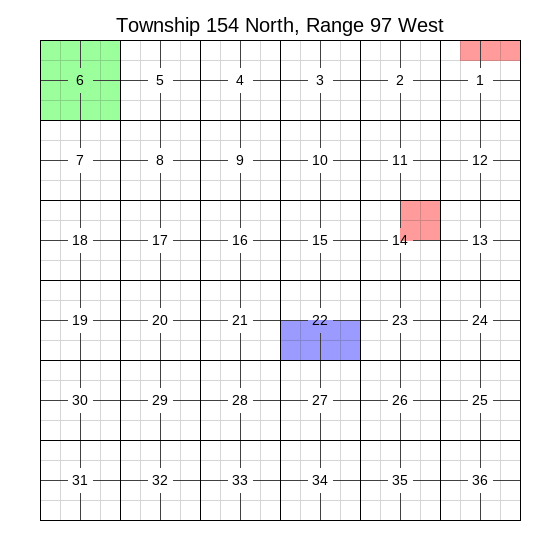
Example Image
(Resized from original output. Click to see full size.)
Example Code
This results in the image above.
import pytrsplat

# Works the same with Plat, MegaPlat, or PlatGroup.
plat = pytrsplat.Plat(settings=pytrsplat.Settings.preset('square_m'))
plat.lot_definer.allow_defaults = True
plat.lot_definer.standard_lot_size = 40

# Add a couple descriptions to 'layer_1'.
plat.add_description('T154N-R97W Sec 14: NE/4', layer='layer_1')
plat.add_description('T154N-R97W Sec 1: Lots 1 - 3', layer='layer_1')
# And another description to 'layer_2'.
plat.add_description('T154N-R97W Sec 6: ALL', layer='layer_2')
# Unspecified layer will use the default layer, called 'aliquot_fill'.
plat.add_description('T154N-R97W Sec 22: S/2')

RED = (255, 0, 0, 100)
GREEN = (0, 255, 0, 100)
plat.settings.set_layer_fill('layer_1', qq_fill_rgba=RED)
plat.settings.set_layer_fill('layer_2', qq_fill_rgba=GREEN)

plat.execute_queue()
plat.output(fp=r"some/file/path.png")
Output layer order
By default, any layers added in this way will be merged in the order they were created (bottom-up). If needed, this can be overridden during .output() by specifying layers=<list of layer names>. But in that case, you need to specify all other layers too. Reference Plat.DEFAULT_LAYER_NAMES for a list of the standard layer names.
# ... Continuing the above block of code.

# This is also the order they get merged.
desired_layers = [
    'background',
    'header',
    'footer',
    'aliquot_fill',
    'layer_1',  # Recommended that custom layers go after 'aliquot_fill'.
    'layer_2',
    'inner_lines',
    'sec_nums',
    'lot_nums',
    'sec_border',
    'twp_border',
]

plat.output(fp=r"some/file/path.png", layers=desired_layers)